
Dis online time an date calculator dey open for everybody, e free to use and you no need sign-up. Below you go see wetin e dey do, how e dey work, an answers to di kain questions wey people dey usually get.
WetIn Dis Calculator Dey Do
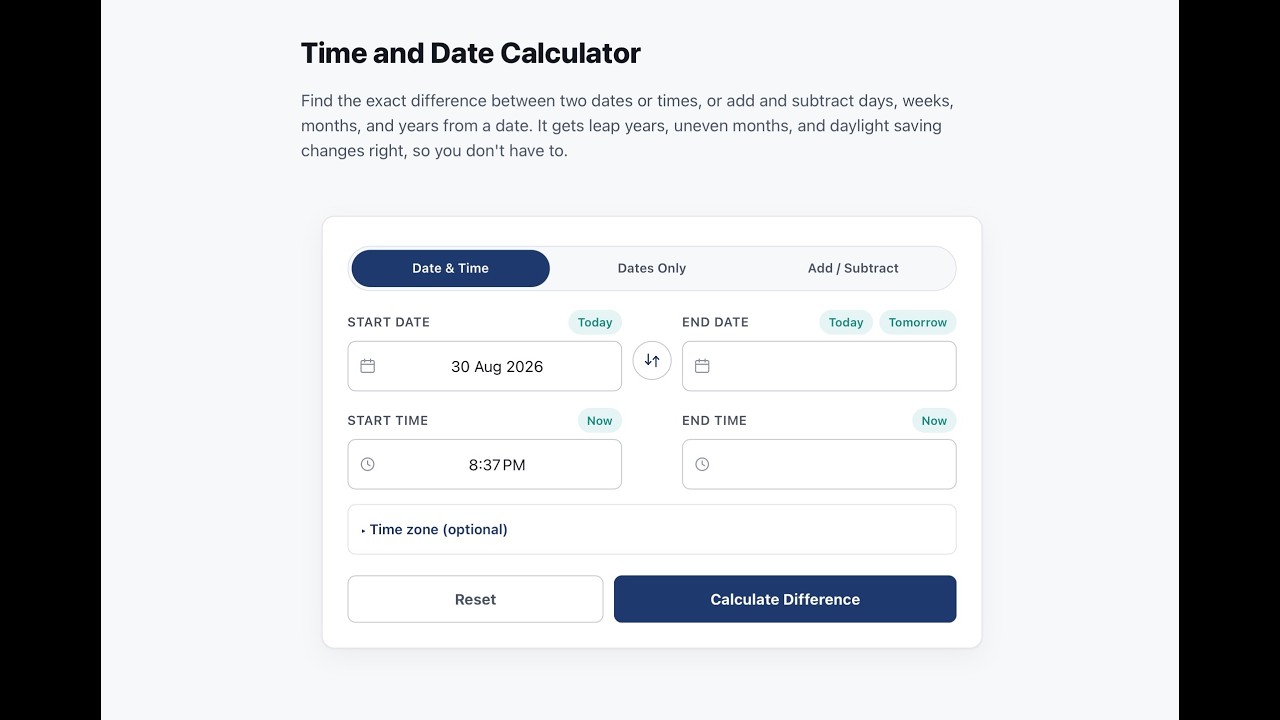
Dis days between calculator get three modes wey you fit switch between wit di buttons for di top of di tool.
Date & Time go find di exact gap between two moments, even reach second, e go consider di clock time for both sides plus optional time zone for each side.
Dates Only go find di gap between two calendar dates when time-of-day no matter, and e get toggle to choose whether make e count di first an last day.
Add / Subtract na di oda way: you start from one date then add or subtract number of days, weeks, months, or years make you land for new date.
All three dem go show full breakdown for years, months, an days, plus running totals. For Date & Time mode, di calculator still dey work as an hours, minutes, seconds calculator, wey go show di exact duration between two moments. E handle leap years, months wey get different lengths, an daylight-saving-time changes so you no need calculate dem by hand.
Who E Dey For
- To work out deadline, renewal date, or notice period
- To find person exact age, or di number of days since one milestone
- To build timesheet or check payable hours for shift
- To arrange meeting or call across time zones
- Any quick "how many days until" or "how many hours between" question
How E Dey Work
For background, di calculator dey convert every date an time into one single continuous number before e do di math, instead of dey count for calendar. Na dis one make am fit handle months wey different, leap years, an daylight saving transitions correctly instead of quietly do wrong. If time wey you enter no dey exist, or e happen twice because clock change, e go mark am instead of quietly miscalculate.
Learn More
Di sections wey dey below go explain more how each mode dey work an di edge cases wey e handle. Expand any one make you see more detail.
How to use each mode
Date & Time mode — Put start date an time an di end date an time. If you want, set different time zone for each side under "Time zone (optional)" if di two ends dey different place. Choose Calculate Difference for full years, months, days, hours, minutes, an seconds breakdown, plus totals for weeks, days, hours, minutes, an seconds.
Dates Only mode — Put start date an end date. Tick "Include end date" if you want make both endpoints count for di total, like rental period wey include move-in day. Choose Calculate Difference for total day count an total weeks, plus years, months, an days breakdown.
Add / Subtract mode — Put start date, choose Add or Subtract, enter amount, an pick whether na days, weeks, months, or years. Select Calculate Date for di resulting date an which day of week e be. If you add or subtract months or years e go try land for same day for di target month when e possible, an if dat day no dey e go fall back to di last valid day for dat month — example, add one month to January 31 go land for February 28, or February 29 inside leap year.
Shortcuts — Today an Now buttons go fill di current date or time with one tap; Tomorrow, wey dey next to di end date, go set am one day ahead; Swap go flip di start an end values. Once result show, Copy Result go put plain-text summary for your clipboard, an Share go open your device share options.
Why manual date counting dey go wrong
When person dey count days by hand e dey meet wahala wey dey repeat.
Months no get same length. February get 28 days most years an 29 for leap year; April, June, September, an November get 30; di oda months get 31. To assume every month go behave like di last one na di most common reason wey result go wrong.
Leap years get one exception wey many no dey remember: year wey divisible by 4 na leap year, but century years (those wey end with 00) na leap year only if dem divisible by 400. 2000 na leap year; 1900 no be. Any calculation wey span many years fit miss one day if you no consider dis.
Whether make you count di first day na convention, no pure math. Lease normally go count move-in day; countdown no go count am. Na why dis calculator get explicit "include end date" toggle insteada e dey guess.
Daylight saving changes fit make one day 23 or 25 hours instead of 24. Dis no too affect plain day count, but e fit spoil hours-an-minutes total if di span cross di transition. Dis calculator dey check for two specific edge cases: time wey no dey because clocks skip am, an time wey happen twice because clocks repeat am — both dem go get flag insteada make e silently produce result wey one hour different.
As quick sanity check: divide day count by 30 for rough month estimate, an by 365 for rough year estimate. If di exact answer look very different from dat, check di year wey you enter again — typo for year na easiest way to get result weh off by full year without e dey look obvious.
Calculating hours, minutes, and timesheets
To compare two clock times na simple subtraction but one additional wrinkle: clock time reset for midnight. If end time dey earlier than start time — example overnight shift from 10 PM to 6 AM — calculation must recognise say day don roll over instead of returning negative number. Date & Time mode dey handle dat automatically.
For payroll, people dey need results two ways: as hours an minutes (8 hours 30 minutes) an as decimal (8.5 hours), because decimal hours easy to multiply with hourly rate. To account for unpaid lunch or break, just subtract dat break length from raw span — 9-hour shift wit 30-minute lunch go pay as 8 hours 30 minutes.
Small common examples:
| Start | End | Total | With a 30-minute break |
|---|---|---|---|
| 9:45 AM | 2:30 PM | 4h 45m | 4h 15m |
| 7:30 AM | 4:30 PM | 9h | 8h 30m |
| 8:00 AM | 5:00 PM | 9h | 8h 30m |
Doing di same math for Excel or Google Sheets
Spreadsheets dey store dates as plain numbers, na why simple subtraction dey work: =B2-A2 go return number of days between two date cells (format di result as number, no as date, or e go show strange).
For years/months/days breakdown, DATEDIF na di standard formula: =DATEDIF(A2,B2,"y") for years, "ym" for remaining months, "md" for remaining days.
For business days only, wey exclude weekends, NETWORKDAYS (or NETWORKDAYS.INTL for custom weekend patterns) fit do di work, an fit exclude list of holidays too.
All dis one dey work di same way for Google Sheets, wey use same date-serial-number system an di same function names — Sheets dey usually more forgiving about how typed date dem interpret.
Time zones an scheduling across locations
Di time zone fields go apply correct offset to any date an time wey you enter for each side, including whether dat zone dey observe daylight saving time now — di gap between two zones no always constant all year. Na offset dem apply to di difference calculation, no be standalone converter wey go turn one specific moment into how e go read for oda place.
Two zones wey dey five hours apart for January fit no dey five hours apart for July, because not every country dey observe daylight saving, an even those wey dey rarely start and end on same dates. For recurring meeting across time zones, better check di offset for di actual date instead of to reuse one wey you calculate months before.
Date formats sef dey different by country — day before month for most of world, month before day for United States, year first under ISO standard wey software dey use. To misread 03/04 as March 4 instead of April 3 na common mistake wey you fit avoid once you check format first.
Frequently Asked Questions
How to Calculate Time From Two Dates
How to calculate time between two dates?
Convert both dates to single number of days since fixed reference point, then subtract earlier one from later one. Dat go give you exact calendar-day count. From there you fit convert to weeks, months, or years for calendar-style breakdown, or apply business-day rule if you want exclude weekends an holidays.
How to calculate time in Excel between two dates?
Subtract earlier date cell from later one (=B2-A2) for day count, or use DATEDIF with "y", "ym", an "md" arguments together for years, months, an days breakdown. Format di result cell as number, no as date, or Excel go display am wrong.
Is there a formula to calculate time?
Yes. For dates, na simple subtraction once both dates convert to common numeric scale. For clock times, na same subtraction, but add 24 hours to end time whenever calculation cross midnight, so result no go come negative.
How to Calculate Time and Day
How to calculate time in a day?
Add up hours an minutes between start an end inside same 24-hour period, dey subtract after you convert both times to 24-hour scale. If di day get unpaid breaks, subtract dem afterwards once you get raw total.
How many hours is 9:45 to 2:30?
From 9:45 AM to 2:30 PM na 4 hours an 45 minutes. If you subtract 30-minute break, like for short shift, paid total go be 4 hours 15 minutes.
How Do I Calculate the Time Between Two Times
How to figure out time between two times?
Convert both times to 24-hour format, add 24 hours to later time if e fall numerically before earlier one (meaning di span cross midnight), then subtract. Di result fit convert clean into hours an minutes or decimal hours, depending on wetin you need.
How to calculate total time between two times in Excel?
Put both times for recognized time format, then subtract earlier cell from later one. Format di result cell with custom time format like [h]:mm so totals over 24 hours go display correct instead of reset to zero.
How to calculate time multiply?
First find duration as decimal number of hours (7.5 instead of 7:30, for example), then multiply dat decimal by any rate or factor wey apply, like hourly wage. To multiply decimal form dey avoid errors wey dey come from multiplying hours an minutes directly.
What Is the Correct Way to Calculate Time
How is time actually calculated?
Both dates an clock times dey convert to single continuous numeric scale first: days since reference point for dates, hours or minutes past midnight for clock times. Dis conversion allow straightforward subtraction to give di gap between dem, avoid wahala of irregular months an midnight reset of clock.
What is the best way to manually calculate hours?
Convert both times to 24-hour format first, then subtract dem as hours an minutes, borrow 60 minutes from hours column if end minutes smaller than start minutes. Subtract any unpaid break last, once you get raw total.
How many hours from 7:30 till 4:30?
From 7:30 AM to 4:30 PM na 9 hours. With typical 30-minute lunch substracted, payable total na 8 hours 30 minutes.
How many hours is 8am to 5pm with lunch?
From 8:00 AM to 5:00 PM na 9 hours. If you subtract standard 30-minute lunch, payable total go be 8 hours 30 minutes; if lunch na one hour e go reduce to 8 hours. Doing dis kind of math by hand no too hard for principle, but e full of small exceptions: months wey get different lengths, leap years, midnight crossings, time zone offsets, an difference between calendar days an working days. Any one of these fit make hand calculation miss by a day or an hour, so na why better tool dey useful even when question look simple. Whether na number of days until deadline, hours for timesheet, or date ninety days from today, same approach dey: convert everyting to consistent numeric scale first, then let subtraction do di work.